The Fusion System
Fusion System
One Complete Platform.
Fusion combines NinjaTrader® 8 indicator design, signal building, strategy automation, optimization, AI Studio, and risk-control tools into one visual workflow. Use only the components your workflow needs: a custom indicator, an automated strategy, a trained model, a parameter sweep, or account-wide risk controls.
The Architecture
Two Suites, One Template Key
Design with the Design Suite, deploy with the Consumer Suite. Your Template Key is the only thing that moves between them.
Design Suite
Active Subscription
Fusion Builder: Visual canvas for wiring your indicator and strategy pipeline.
Fusion Echo: Toggle outputs to the price chart, aligned to the price scale, with one click.
Fusion Signal: Render entry and exit signals on the chart and in a dedicated panel as you build.
Fusion Strategy Optimizer: Walk-forward optimization and parameter tuning in NinjaTrader® Strategy Analyzer.
AI Studio / Fusion ML Trainer: Included with the Fusion System. Capture selected numeric canvas outputs, train models locally, and create ONNX model blocks for your Fusion pipeline.
Consumer Suite
Saved Templates Keep Running
Fusion Indicator: Runs completed indicator templates on live NinjaTrader® charts.
Fusion Strategy: Runs completed strategy templates with chart-attached controls and execution options.
Completed templates that include ONNX model blocks may continue to run using the installed version when the required local model/runtime files remain available, subject to compatibility and technical limits.
Included but optional
Fusion Risk Engine: Optional account-wide controls for P&L limits, lockouts, and emergency flattening outside an individual chart. It operates outside the Template Key workflow.
Subscription access is required for the Design Suite, including Builder, Echo, Signal, Strategy Optimizer, and AI Studio / Fusion ML Trainer workflows. Saved templates and SetupIDs can keep running in Fusion Indicator and Fusion Strategy after cancellation, subject to compatibility, any required local files, and technical limits. The Manual Trade Planner requires active or paid-through subscription access.
DESIGN SUITE
Fusion Builder
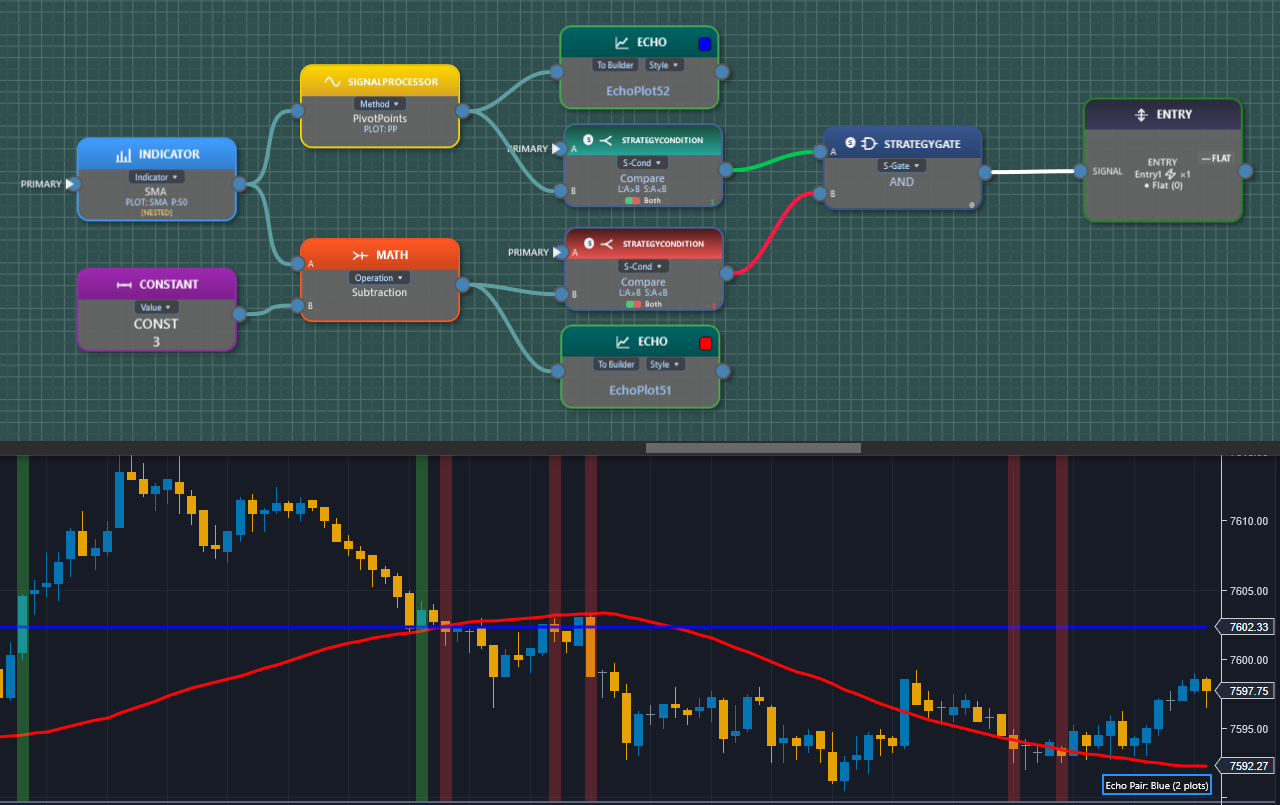
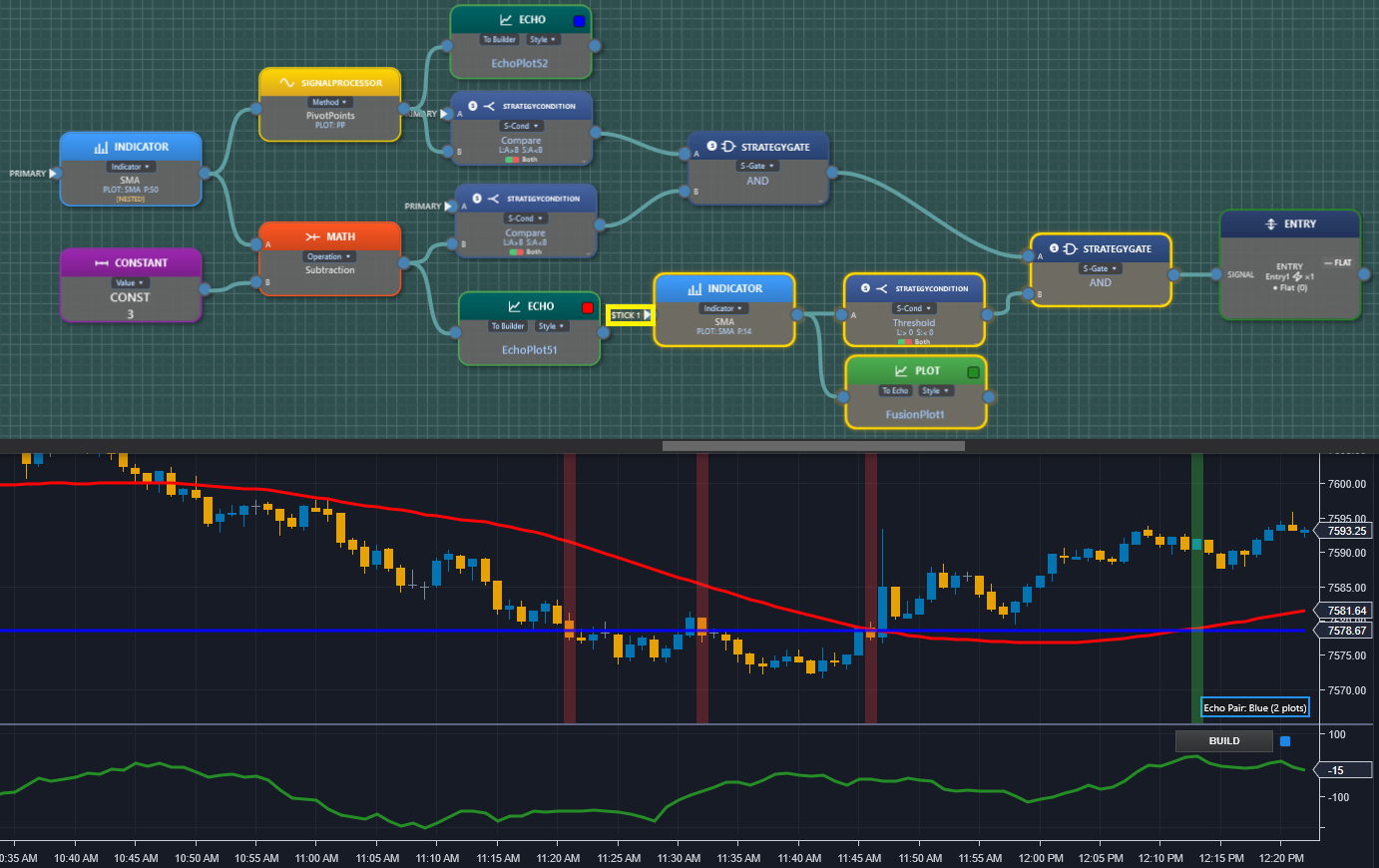
The visual logic factory where you build everything. You place block types (Indicator, Math, Signal, Condition, Gate, State Machine, OrderFlow, ONNX, and more) onto a canvas and wire inputs to outputs. Every connection plots a result directly on your NinjaTrader® chart in real-time.
V1.0 works with standard NinjaTrader® built-in indicators that output plotted values, plus custom math functions. Third-party and custom indicator support is planned after the NinjaTrader export path is fully validated. Multi-series and multi-timeframe support lets you pull a secondary instrument (VIX, TICK, ADV/DECL, or a different timeframe of the same instrument) directly into your formula. There’s no compile cycle or reload, so feedback is instant.
Real-Time Chart Feedback
Multi-Series & Multi-Timeframe
Deep Data Export
TEMPLATE PORTABILITY
Requires Active Subscription
Multi-Series & Multi-Timeframe
Deep Data Export
TEMPLATE PORTABILITY
Requires Active Subscription
DESIGN SUITE
Fusion Echo
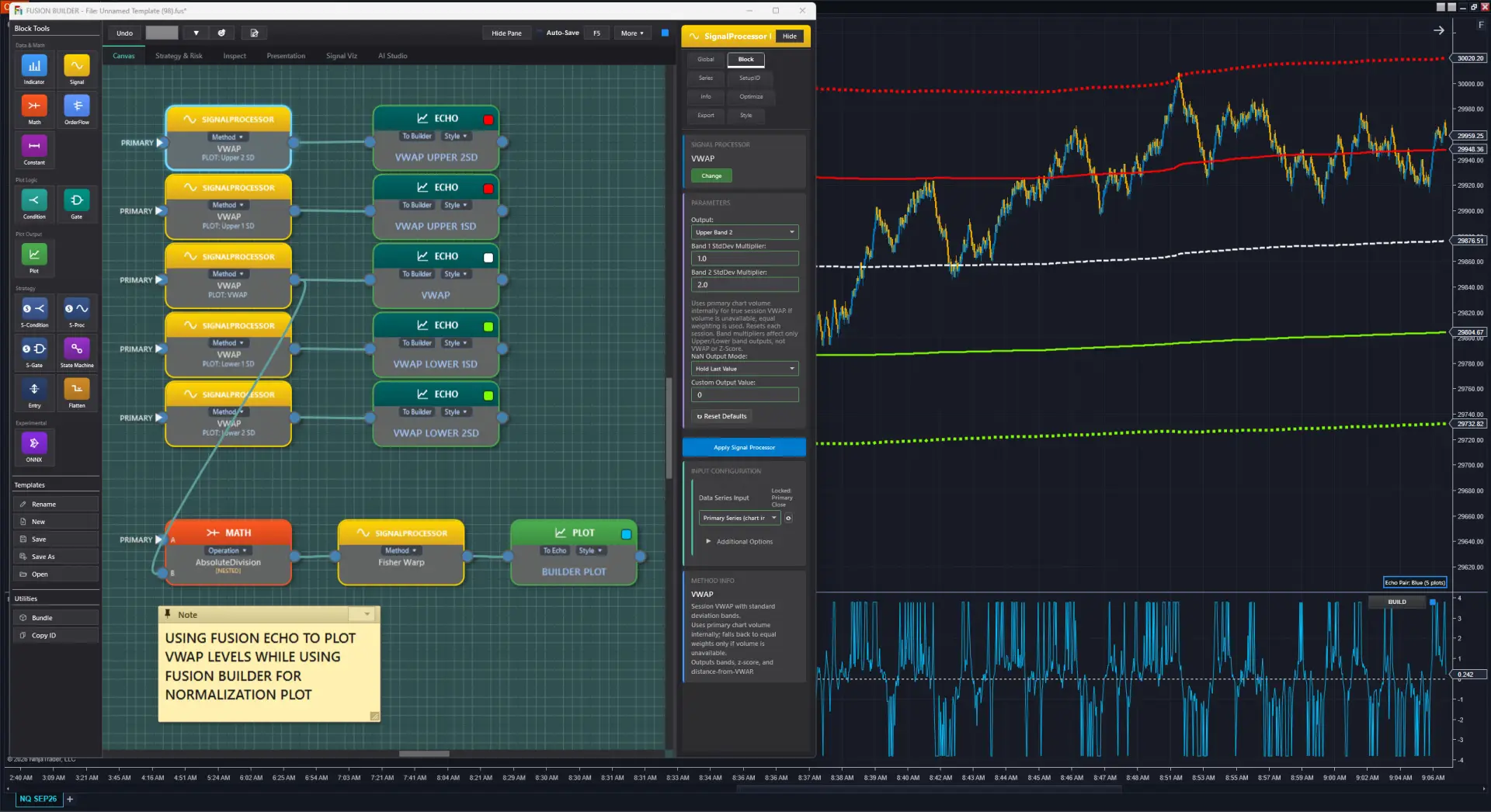
Fusion Echo gives you a dual display: plot your indicator output to the price chart and in a separate panel at the same time, in the same chart window.
When Echo renders on the price chart, your indicator values line up with the price scale, so you can directly see how your custom indicator relates to actual price action. That makes it much easier to understand how your indicator behaves.
Meanwhile the panel stays free for normalized outputs, smaller-scale values, or any other visualization that doesn’t share the price scale. Run multiple Builder + Echo instances on the same chart, and they’re color-hash synchronized for instant visual pairing.
One-Click Price Chart Toggle
Price-Scale Synchronized
Color-Hash Paired
Multi-Instance Support
Price-Scale Synchronized
Color-Hash Paired
Multi-Instance Support
⚠️ Simulator Disclaimer
Fusion Signal is a visual approximation tool only. Live automated strategies can always behave differently than simulated results. It is not a substitute for proper backtesting and running in NinjaTrader®’s simulation mode before live deployment.
DESIGN SUITE
Fusion Signal
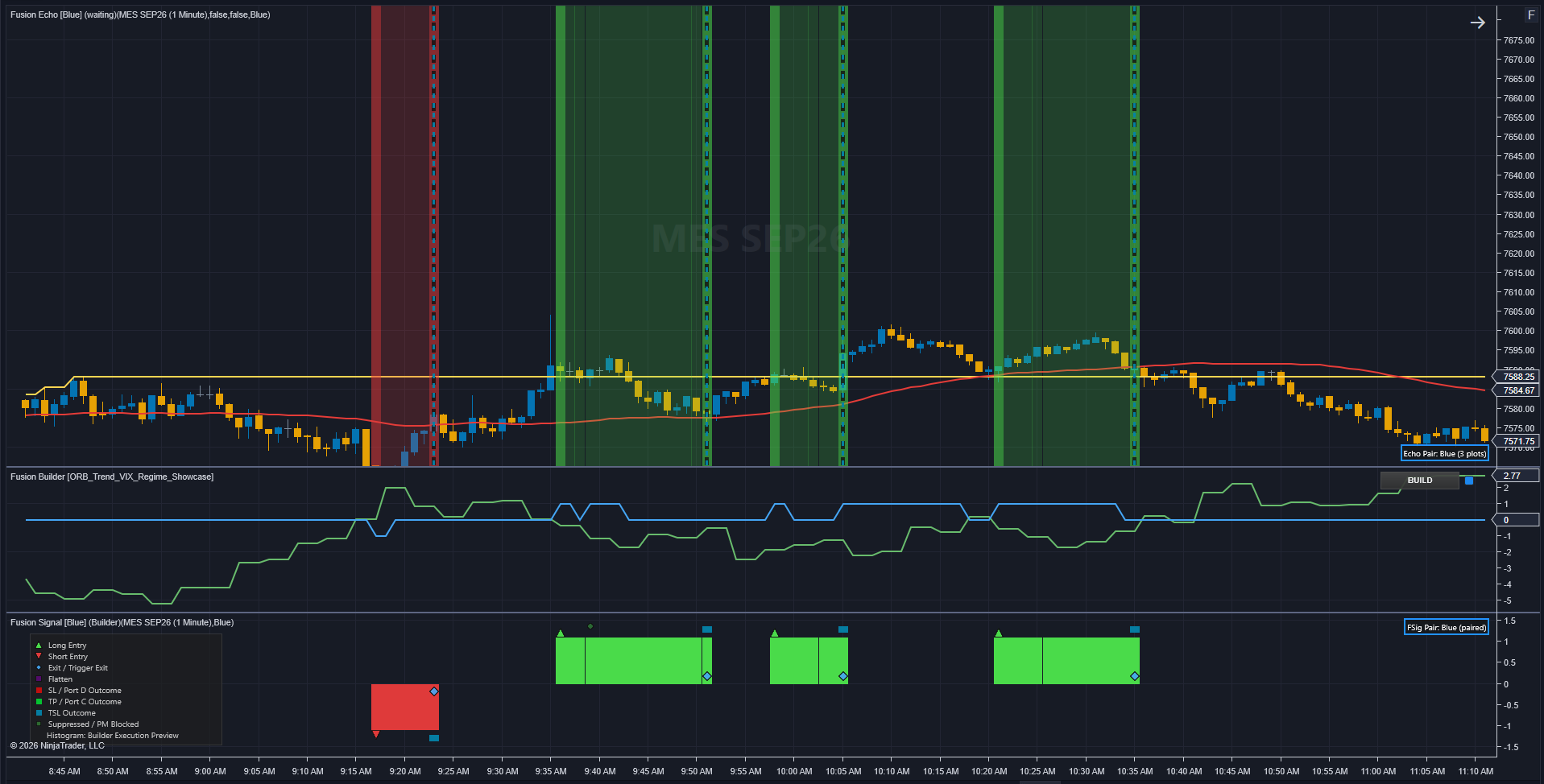
The visual strategy simulator with a dual-panel display, similar to Fusion Echo’s architecture. While building in Fusion Builder, racing stripes overlay the price chart to show signal activity directly on price, while the histogram and signals render in a separate panel. This keeps your Builder panel free for indicator math, with no clutter and clean separation.
See entries, stops, trailing stops, profit targets, flatten conditions, and ghost signals as you build, a live approximation of strategy behavior before you commit to a full backtest or simulation.
Visual Strategy Simulator
Racing Stripes on Price Chart
Histogram + Signals in Panel
Builder Panel Stays Free
Racing Stripes on Price Chart
Histogram + Signals in Panel
Builder Panel Stays Free
The TEMPLATE KEY copied from Fusion Builder’s canvas, pasted into a new Fusion Indicator instance with no .fus file involved. Both panels plot the same composite line, since the TEMPLATE KEY alone carries the full design.
CONSUMER SUITE
Fusion Indicator
A lightweight runtime for live execution. Paste your TEMPLATE KEY and your Fusion Builder design runs as a fully native NinjaTrader® indicator with minimal CPU overhead, with no source code or recompiling required.
Saved templates and SetupIDs keep running. Even after a Builder subscription ends, your completed templates and SetupIDs keep running. Deploy to as many charts as you want.
Saved Templates Keep Running
Minimal CPU
TEMPLATE KEY Powered
Deploy Unlimited Charts
Minimal CPU
TEMPLATE KEY Powered
Deploy Unlimited Charts
CONSUMER SUITE
Fusion Strategy
Take your Builder design from indicator to full automated strategy. Fusion Strategy wraps your visual logic in NinjaTrader®’s Strategy framework, using S-Condition, S-Proc, S-Gate, Entry, Exit, and Flatten blocks built for strategy execution.
Load a .fus template and your TEMPLATE KEY auto-populates instantly, with no copy-pasting. Run live automated trading, backtest on-chart for a quick check, or use NinjaTrader®’s Strategy Analyzer for full historical backtesting. No C# editing is required; strategy blocks (S-Condition, S-Proc, S-Gate, Entry, Exit, Flatten) handle all execution logic visually. Your saved templates and SetupIDs keep running with Fusion Strategy even after a subscription ends.
Automated Trading Algo
.fus Template Auto-Load
Live + Backtest + Sim
No Code Required
.fus Template Auto-Load
Live + Backtest + Sim
No Code Required
⚠ HYPOTHETICAL PERFORMANCE RESULTS — CFTC RULE 4.41
Hypothetical performance results have many inherent limitations. No representation is being made that any account will or is likely to achieve profits or losses similar to those shown; in fact, there are frequently sharp differences between hypothetical and actual results. These results are prepared with the benefit of hindsight, do not involve financial risk, and cannot fully account for the impact of financial risk of actual trading. Full Risk Disclosure →
DESIGN SUITE
Fusion Strategy Optimizer
A mirror of Fusion Strategy, purpose-built for NinjaTrader®’s Strategy Analyzer optimizer. In Fusion Builder’s Optimizer tab, choose which parameters in your math pipeline to optimize and set their spacing. Save those settings to your .fus template.
Open that template in Fusion Optimizer and your parameters, ranges, and spacing populate automatically, ready to run. NT’s Strategy Analyzer sweeps all combinations. Find the best-performing configurations without writing a line of code.
.fus Template Auto-Load
Parameters Auto-Populate
NT Strategy Analyzer
No Code Required
Parameters Auto-Populate
NT Strategy Analyzer
No Code Required
Get Started
Ready to Build?
View pricing and choose a monthly or annual subscription. Fusion access is managed through your FusionIndicators.com customer portal after purchase.
NinjaTrader is a registered trademark of NinjaTrader Group, LLC. No NinjaTrader company has any affiliation with the owner, developer, or provider of the products or services described herein, or any interest, ownership or otherwise, in any such product or service, or endorses, recommends, or approves any such product or service.
© 2026 Fusion Indicators LLC. All Rights Reserved. | Privacy Policy | Terms of Service | Refund Policy | Cookie Settings