WHERE IT STARTED
Our Story
The Fusion Indicator System started with a simple question: why is this so hard? The idea was straightforward: subtract the WilliamsR of the ES (1-minute) from the WilliamsR of the VIX and use that relationship as a trading signal. Simple math. But turning that into something on a live NinjaTrader® chart meant writing C# from scratch. One calculation shouldn’t require a computer science degree.
Writing the C# was only half of it. Every change meant a compile, a chart reload, and a wait before you could see whether the idea was worth keeping. Change a period, compile, reload, look. An afternoon of testing variations becomes a handful of attempts. We wanted the loop short enough that trying a variation costs nothing, so the question becomes what to test next instead of whether it is worth the wait.
We built Fusion as the tool we always wished we had, and we haven’t stopped. What started as a solution to one problem became an eight-component visual design system: 350,000+ lines of shipping C# across seven components, a Python-based Fusion ML Trainer, and a pipeline architecture that lets traders express ideas visually instead of syntactically.
We didn’t plan all of this upfront. We just kept solving the next problem.
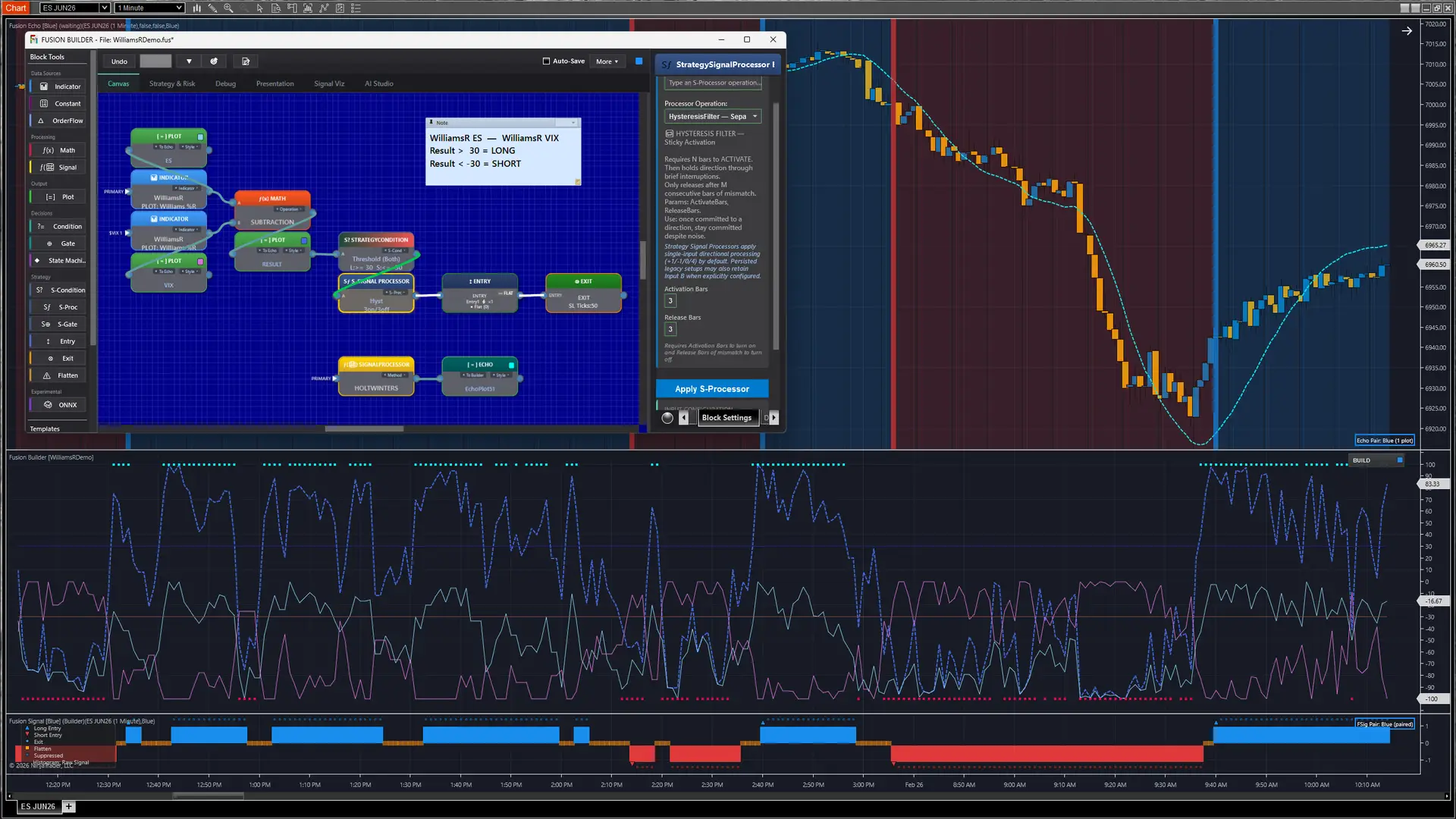
Live screencapture: Fusion Builder, Fusion Signal & Fusion Echo plotting the idea that started it all. This is the first version of the Builder, from the first screenshot we ever took.
Shown for illustrative purposes only. Not trading advice. Past results do not guarantee future performance.
THE POWER
What NinjaTrader® Already Does Well
NinjaTrader® 8 gives futures traders one desktop platform for charting, market data, order entry, testing, and automation. ATM strategies can submit stop-loss and profit-target orders after an entry fills, link those exits as OCO orders, and manage trailing stops and breakeven rules. SuperDOM and Chart Trader keep order entry and position management beside the chart and data feed.
NinjaTrader Clearing is a CFTC-registered futures commission merchant and an NFA member. NinjaTrader was founded in 2003 and now operates as a standalone platform in Kraken’s product suite.
Strategy Analyzer runs historical backtests, parameter optimization, walk-forward optimization, multi-objective optimization, basket tests across instruments, and Monte Carlo analysis. Playback can run Market Replay or historical tick data through NinjaTrader windows, indicators, and strategies. Tick Replay serves a different purpose: it reconstructs historical market-data events for compatible scripts and is not intended as a strategy-backtest fill engine.
NinjaScript is C# on the .NET Framework. It supports Level I and Level II event hooks through OnMarketData and OnMarketDepth, multiple instruments and timeframes in one script, custom bar types, drawing tools, AddOn windows, and external assemblies. Automated strategies run inside NinjaTrader beside its market data and order connections.
Fusion builds on that foundation by making the indicator and strategy logic between these capabilities visual. NinjaTrader continues to provide the charting, market data, order handling, testing, and automation. None of that is what we set out to change. We build on all of it.
THE FRICTION REMOVED
Where the Friction Was
C# is what gives NinjaScript its power. Developers can build indicators, work with market data and charts, create strategies, and handle orders inside NinjaTrader®. AI can help write that code, but every change still has to be reviewed and validated inside the platform. Change a period, stop, indicator, or condition, and the development loop begins again. Fusion moves that design work onto the canvas: change a block once, and the connected plot and signal logic update from the same source.
There is no Indicator Builder. NinjaTrader® has confirmed on its own support forum that the Strategy Builder has no counterpart for indicators; building or customizing one means NinjaScript. Fusion is that missing environment. Load Fusion Builder and every NinjaTrader® built-in indicator is available on the canvas: nest them, run live math between instruments and timeframes, route actual numeric values through conditional logic instead of true/false flags, and filter the result through 425+ core operations, including signal-processing methods like entropy-based complexity measures, adaptive cycle analysis, and composite regime detection. Every change plots as you make it, with no compile step, no chart reload, and no digging through menus.
The Strategy Builder has boundaries, and they are documented. It supports If All and If Any condition groups and can use additional data in conditions, but Builder-generated trades are submitted from the primary series. The Strategy Builder is good at what it does. Fusion picks up where it stops: the same indicator design can continue into strategy logic without being rebuilt in another tool. Add strategy blocks, watch Entry and Exit signals paint on the chart as you adjust parameters before any order exists, then push the finished design to Fusion Strategy and backtest it in NinjaTrader®’s Strategy Analyzer. Multi-series and multi-timeframe logic stay in the same design.
No webhooks in the path. A common workflow designs the strategy on one platform, then passes each signal through a webhook into NinjaTrader® to execute. It works, but it is two platforms, two subscriptions, and a relay with delays the bridge makers themselves document. Fusion skips that middle entirely. You design the strategy inside NinjaTrader®, on the same chart that executes it: no webhook, no bridge account, no external endpoint that has to be reachable and responding.
One system on the chart. Add the Fusion components once, the way you would add any indicator and strategy. After that, the work moves onto the canvas: Builder, Indicator, Echo, Signal, and Strategy hand off to each other, so building, testing, and refining no longer starts with a trip through the menus. The system rides on top of NinjaTrader® and drives it, and most days it is the only surface you touch.
That is the trade we made: 350,000+ lines of shipping C# across seven components, plus the Python-based Fusion ML Trainer, so you build on the canvas instead of writing the underlying C# or Python.
350K+
Lines of C# We Wrote
8
Specialized Components
NT8
Native Architecture
0
Lines You Write
YOUR DATA, YOUR FEATURES, YOUR RULES
Machine Learning You Own
AI Studio and the Fusion ML Trainer are included with the Fusion System. Together they provide the first no-code way to visually pick your indicators as features, train a machine-learning model locally, and run it natively inside NinjaTrader®.
You train on your own data. The features come from your own canvas: you choose which blocks feed the model, and it learns from the outputs of those blocks, the same values you already watch on your chart. There is no dataset to buy. Training runs locally through the Fusion ML Trainer, included with the system as its own installer, and the trained model is written to your NinjaTrader® templates folder, ready for the ONNX block on your canvas. It is a file you own on a machine you control, not a model you rent from someone else’s cloud.
What comes back is a number, not a buy or sell signal. Every rule about what that number means is one you write.
Machine learning is only as good as the discipline behind it. A model that fits its training data perfectly and falls apart out of sample is the normal outcome, not the rare one, which is why the workflow is built around testing whether a model holds up rather than around trusting it.
*Model training results depend entirely on your data, your configuration, and your validation. Test before you trust.
HOW WE BUILD
Our Principles
●
Purpose-built components
Every component has a clear job. No bloat. No feature creep.
●
Keep what you build
Your templates and the indicators and strategies you created during your subscription remain functional after cancellation.* See FAQ for details.
●
Trader-first design
Every decision starts with: does this make the workflow faster, clearer, or more capable? If not, it doesn’t ship.
●
Fast iteration Drop a block on the canvas and the plot is there. Wire an indicator into a math operation and the derived series updates as you make the connection. Add strategy condition blocks that decide your signals on the same canvas, and the entries and exits they produce show on the chart immediately. Push the design to Fusion Strategy and backtest it on your chart’s data. Change a wire or a parameter and the plots adapt in real time, so pushing again and re-testing takes moments; when a design is worth tuning, Fusion Optimizer sweeps its parameters without code. This loop is the part of Fusion we are proudest of. The runtime components follow NinjaTrader®’s indicator lifecycle as closely as we can make them.
ALWAYS IMPROVING
We are actively developing new features and expanding capabilities with every release. We are not guaranteeing any specific future features, but we are relentlessly improving and adding to the product. We want this to be a community: the best features come from the people who use them.
Have a Question?
Reach us at sales@fusionindicators.com for general inquiries or support@fusionindicators.com for technical support.
RISK DISCLOSURE: Futures and forex trading contains substantial risk and is not for every investor. An investor could potentially lose all or more than the initial investment. Risk capital is money that can be lost without jeopardizing ones financial security or life style. Only risk capital should be used for trading and only those with sufficient risk capital should consider trading. Past performance is not necessarily indicative of future results.
NinjaTrader® is a registered trademark of NinjaTrader Group, LLC. Fusion Indicators LLC is an independent software vendor and is not affiliated with, endorsed by, or sponsored by NinjaTrader.
© 2026 Fusion Indicators LLC. All Rights Reserved.
Risk Disclosure | Privacy Policy | Terms of Service | Refund Policy | Cookie Settings | Support
Manage Consent
To provide the best experiences, we use technologies like cookies to store and/or access device information. Consenting to these technologies will allow us to process data such as browsing behavior or unique IDs on this site. Not consenting or withdrawing consent, may adversely affect certain features and functions.
Functional
Always active
The technical storage or access is strictly necessary for the legitimate purpose of enabling the use of a specific service explicitly requested by the subscriber or user, or for the sole purpose of carrying out the transmission of a communication over an electronic communications network.
Preferences
The technical storage or access is necessary for the legitimate purpose of storing preferences that are not requested by the subscriber or user.
Statistics
The technical storage or access that is used exclusively for statistical purposes.
The technical storage or access that is used exclusively for anonymous statistical purposes. Without a subpoena, voluntary compliance on the part of your Internet Service Provider, or additional records from a third party, information stored or retrieved for this purpose alone cannot usually be used to identify you.
Marketing
The technical storage or access is required to create user profiles to send advertising, or to track the user on a website or across several websites for similar marketing purposes.