Fusion Indicators
A visual indicator and strategy design system for NinjaTrader® 8. Build with one set of tools, run what you built with another set of tools, in the same chart.
What’s in your subscription?
Your subscription includes the Fusion System for NinjaTrader® 8, the Fusion ML Trainer for AI Studio / ONNX workflows, and the included-but-optional Fusion Risk Engine. Use the design and training tools while your subscription is active; completed templates and SetupIDs can keep running in Fusion Indicator and Fusion Strategy after cancellation using your installed version, subject to compatibility, required local files, and technical limits.
See what’s includedWhat you’ll download
FusionIndicatorsV1.0.0.1_NT8_8.1.7.2.zip
Fusion Builder, Indicator, Echo, Signal, Strategy, Strategy Optimizer, and Fusion Risk Engine. Import this ZIP through NinjaTrader® 8 → Tools → Import → NinjaScript Add-On.
FusionONNXTrainerSetup-1.0.0.exe
Included with your subscription. Installed once to power AI Studio / ONNX model-training workflows inside Fusion Builder.
 Customer portal → Downloads
System requirements
Fusion Indicators for NinjaTrader® requires NinjaTrader Desktop 8.1.6.0 or later on 64-bit Windows 11. Fusion is tested with the current NinjaTrader Desktop release. Most Fusion features do not require Order Flow+. Optional Fusion features that use NinjaTrader® Order Flow+ data, such as Volume Profile or Order Flow+ inputs, require Order Flow+ access in your NinjaTrader account or license. Order Flow+ is a feature of the NinjaTrader® platform and is not included with a Fusion Indicators subscription.
Your subscription includes access through your FusionIndicators.com customer portal to the Fusion System third-party add-on for NinjaTrader® and the separate Fusion ML Trainer Windows installer used by AI Studio. Download Fusion installers only from your FusionIndicators.com customer portal.
From checkout to charting in minutes
After checkout, your Fusion downloads and license key appear in the customer portal. Download the NinjaTrader export ZIP, import it through NinjaTrader’s built-in NinjaScript Add-On importer, paste your Fusion license key once, and start building. ▶ Watch the install walkthrough (4½ min) · Docs & user guides
- 1 Download the Fusion NinjaTrader ZIP from the customer portal.
- 2 Import it in NinjaTrader through Tools → Import → NinjaScript Add-On.
- 3 Restart NinjaTrader.
- 4 Add Fusion Builder to a chart.
- 5 Copy your license key from the portal.
- 6 Paste it once to activate Fusion.
Downloads and license keys may take a few minutes to appear after checkout.

Choose your subscription
Simple, standard pricing
Fusion Indicators is $79.99/mo billed monthly or $699/yr billed annually. Both plans include the same Fusion System downloads and license; the only difference is how often you are billed.
Already an early adopter? Subscribers who started a paid subscription on or before August 31, 2026 keep their early-adopter rate ($59/mo or $499/yr) for their first 12 months, then receive an ongoing 25% loyalty discount off the then-current standard price for as long as the subscription stays continuously active, as described in the Terms of Service.
Questions about your subscription
What happens to my work if I cancel?
Everything you build in Fusion stays yours: your canvases, indicators, and strategies are saved locally in NinjaTrader, not in the cloud. Canceling removes access to the Fusion tools, but nothing you've built gets deleted. You can still run indicators and strategies you deployed before canceling; you just can't open or edit them in Fusion Builder until you resubscribe.
Note: Future NinjaTrader updates may introduce changes that affect how existing indicators behave. Without an active subscription, indicators you've built won't receive maintenance or fixes. They'll continue to run, but compatibility with newer versions of NinjaTrader isn't guaranteed.
Is it a hassle to cancel?
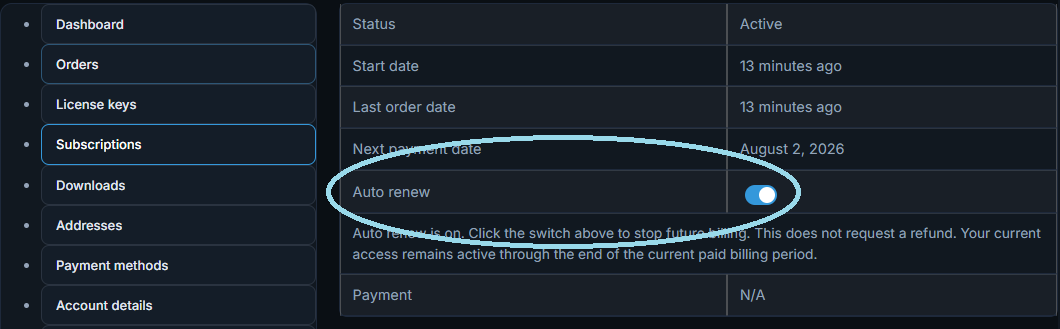
Not at all. The option to stop future billing is right on your subscription page in the customer portal: no digging through settings, no hidden cancellation flow. Log in, find your subscription, and toggle the Auto renew switch off to cancel. It's that simple.
What is the refund policy?
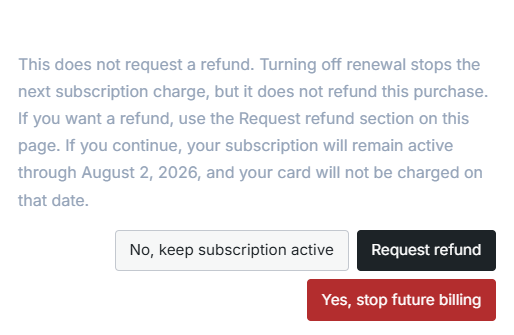
We offer a 7-day refund window from the date of your initial purchase. To request a refund, go to your subscription page in the customer portal and toggle the Auto renew switch off. If you're within the 7-day window, a popup will appear with a "Request refund" option. Click that, or use the refund request form at the bottom of your subscription page, to submit your request. We review every refund request by hand, and requests within the 7-day window are approved in the vast majority of cases. We only decline in unusual situations like suspected abuse or fraud.
Is the license tied to my NinjaTrader account?
No. Your Fusion Indicators license is separate from your NinjaTrader account. It is tied to the license key you receive from the Fusion Indicators customer portal. You enter that key once inside NinjaTrader to activate your subscription.
How many computers can I use Fusion on?
Your subscription covers up to 2 computers at a time. If you need to activate a new computer and have already reached the limit, contact support to release an old one. Self-service machine release is planned for a future portal update.
What happens if I switch to a new computer?
Install NinjaTrader and Fusion on your new computer and enter your license key. If your previous computer is still taking up one of your activations, contact support and they can release it so your new computer can activate.
Does Fusion work offline?
Yes, with a grace period. Fusion periodically checks your license in the background. If your internet connection is unavailable, Fusion continues working for up to 7 days. After that, subscription features pause until your connection is restored and the check completes.
How is billing managed?
Your subscription is managed entirely through the Fusion Indicators customer portal, not through NinjaTrader. You can view your renewal date, update your payment method, and stop future billing from the portal without contacting support.
Where do I find my license key?
Your license key is in the Fusion Indicators customer portal under your active subscription. You only need to enter it once per computer.
What happens if my payment fails?
If a payment fails, your subscription enters a short retry window. You will be notified and can update your payment method from the portal. If the payment is not resolved, your subscription expires and active-subscription features pause. Saved templates and SetupIDs in Fusion Indicator and Fusion Strategy may continue running on your installed version as long as the subscription lapsed normally and was not refunded or revoked.
Can I share my license key with someone else?
No. Each license key is for a single subscriber and is limited to 2 computers. Sharing a key will trigger the activation limit and may result in access being paused or the license being revoked.
Risk Disclosure
RISK DISCLOSURE: Futures and forex trading contains substantial risk and is not for every investor. An investor could potentially lose all or more than the initial investment. Risk capital is money that can be lost without jeopardizing ones financial security or life style. Only risk capital should be used for trading and only those with sufficient risk capital should consider trading. Past performance is not necessarily indicative of future results.
NinjaTrader® Trademark Notice
NinjaTrader® is a registered trademark of NinjaTrader Group, LLC. Fusion Indicators LLC is an independent software vendor and is not affiliated with, endorsed by, or sponsored by NinjaTrader.